
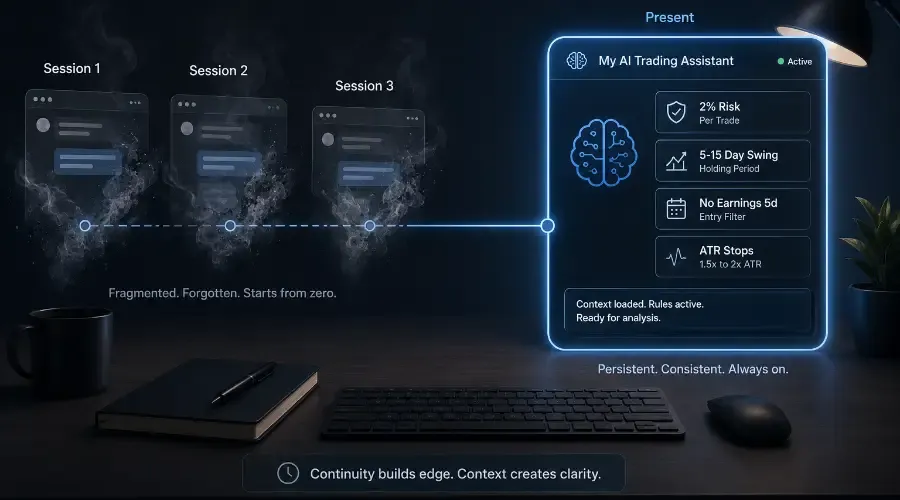
Every time you open a new Claude conversation, you start from zero. The model doesn't know you trade semiconductors with a 5-to-15 day holding period, that your risk rule is 2% per trade, or that you never enter within five days of an earnings release. You either re-explain your context every session, accept generic output that isn't calibrated to your strategy, or find a workaround that half-solves the problem.
Claude Projects solve it completely. A Project is a persistent AI workspace – a custom AI trading workflow where your strategy, rules, sector focus, and risk parameters live permanently in a system prompt that applies to every conversation automatically. You don't re-explain. You paste the data and run the prompt.
This post covers how to build that workspace from scratch.
Note: Claude Projects are available on Pro and Team plans. Free-tier users should be aware of this before building toward this setup. The underlying principles – persistent system prompts, strategy calibration – apply to OpenAI GPTs and Google Gems, but the specific steps here are Claude-specific.
Why Standard Conversations Fall Short
Standard Claude sessions are stateless – they reset to default for every conversation. Getting strategy-calibrated output requires re-establishing your entire context each session: holding period, sector focus, risk rules, output preferences. That's 3 to 4 minutes of context re-establishment before you've run a single prompt, and the calibration is still approximate rather than precise.
A Claude Project changes this with a system prompt – a permanent instruction layer that sits above every conversation in the Project and shapes every response the model produces. The practical difference: in a standard conversation, rule application depends on whether you remembered to include the rule in your context re-establishment. In a Project, the rule applies automatically whether or not you mention it – because it's in the system prompt, it applies to everything.
One important framing before building: this assistant is a decision-support tool, not a fiduciary. Never let it be the final arbiter of a risk decision, including position sizing math it generates. AI models are probabilistic – even a well-built system prompt doesn't eliminate the possibility of misapplied rules or plausible-sounding but incorrect calculations. Verification remains a human responsibility at every step.
How to Write a System Prompt That Captures Your Trading Style
The system prompt is the most important document in your AI trading workflow. A well-written one covers six dimensions.
Trading style and timeframe
What type of trader are you and how long do you hold? This is the first calibration layer – it tells the model whether to weight momentum signals or longer-duration fundamentals, and what "near-term" means when it appears in your prompts.
"I am a swing trader focused on US technology and semiconductor stocks. Typical holding period: 5 to 15 trading days. Top-down approach – macro regime to sector selection to individual stock selection."
Strategy rules
The specific entry and exit criteria that define when you trade and when you don't. State these as precise conditions the model should flag automatically when violated.
"Entry criteria – all four must be met: (1) XLK or SOXX showing positive 5-day relative strength vs SPY; (2) stock above 20-day EMA; (3) session volume at or above 0.8x the 20-day average; (4) no earnings scheduled within the next 5 trading days. Flag any unmet condition as NO-GO without requiring it to be specified in the individual prompt."
Risk framework
State risk rules as precise parameters rather than general principles – the model will apply them mechanically in position sizing and compliance checks.
"2% of total account value per trade. Stops at 1.5x to 2x the 14-period ATR below entry. Maximum 30% sector concentration in semiconductors combined. No averaging down on positions that have breached their initial stop. Minimum 2:1 risk-reward ratio."
Sectors and exclusions
Exclusions are as important as inclusions for keeping analysis relevant and preventing scope drift.
"Primary: Technology (XLK), Semiconductor sub-sector (SOXX constituents). Secondary: Communication Services (XLC) when rotation is constructive. Out of scope: penny stocks, average daily volume below 1 million shares, biotech catalyst plays, leveraged ETFs, any stock with earnings within 5 days."
Output preferences
Consistent formatting compounds over time – a model that always structures output the way you find useful produces responses you can act on faster.
"Structured sections with clear labels. Maximum 4 sections unless complexity requires more. Assume familiarity with technical analysis, fundamental ratios, and macro frameworks – no background explanation unless asked. Always state confirmation conditions, invalidation level, and specific figures flagged for verification. Use probabilistic language: 'typically,' 'historically,' 'may suggest' – never definitive directional statements."
Verification standards
The habits you want reinforced consistently across every session.
"Flag any figure that should be verified against its primary source. Never introduce earnings dates, analyst estimates, or fundamental data from training memory without explicitly stating the figure may be outdated. All specific financial figures must be traced to data provided in the prompt."
A system prompt covering all six dimensions runs 400 to 600 words – enough to capture the specifics that make output genuinely calibrated without introducing conflicts. As your Project Knowledge base grows, keep the system prompt lean: a bloated system prompt increases the risk of the model deprioritising your most recent inputs.
What to Include, What to Leave Out
Include rules that apply consistently across every session – risk parameters, entry criteria, sector focus, output preferences. Include categorical exclusions – instruments you never trade, hard concentration limits. Include context that would take time to re-establish every session and never changes.
Leave out current positions (paste these into individual prompts when relevant), specific market views (these change with the market), occasional strategy variations (consider a separate Project), and individual prompt format requirements (these belong in your prompt library templates, not the system prompt).
One Project or Multiple?
One Project per strategy is right when you run meaningfully different approaches – a swing strategy and a longer-term fundamental book, for example. Mixing significantly different strategies in one system prompt produces output that hedges between frameworks rather than committing clearly to either.
One master Project is right for most retail traders running a single primary strategy. The single persistent workspace builds the most coherent analytical continuity, and your prompt library templates handle the variety of analytical tasks within that consistent strategic context.
The AMD Example – Standard Conversation vs Project
The same request in both contexts makes the difference concrete.
Standard conversation
The trader opens a new session and spends 3 to 4 minutes re-establishing context – holding period, entry criteria, risk rules, earnings exclusion – before pasting the AMD setup data. The calibration is approximate. The earnings exclusion rule only applies if the trader remembered to include it.
Well-built Project
The trader opens the Project and pastes directly:
"AMD pre-earnings setup assessment. Earnings in 4 days. Here's the data: [OHLCV table, indicator readings, key levels, ATR, XLK 5-day performance vs SPY, AMD volume vs 20-day average]. Run the entry criteria check and position sizing if all conditions pass."
The Project immediately flags the NO-GO: AMD earnings in 4 days falls within the 5-day exclusion window. The rule was in the system prompt. It applied automatically. No re-establishment required, no risk of forgetting to mention the rule under time pressure.
The Maintenance Habit
A system prompt that accurately reflected your rules six months ago but hasn't been updated since is worse than no system prompt. A model operating on outdated parameters produces output confidently calibrated to a strategy you no longer follow.
The maintenance habit is simple: whenever a meaningful rule changes, update the system prompt immediately – not eventually. Specific triggers: account size changes significantly, risk rules are revised, sector focus shifts, entry criteria are updated, output preferences evolve. The update takes one to two minutes when the change is fresh. Deferred, it becomes a reconstruction project.
Treat the system prompt as a living document that evolves with your strategy – the same discipline recommended for managing any systematic trading process.
Connecting the Project to the Full Workflow
The Project is the container. Your prompt library (reusable templates for every recurring analytical task) provides the templates that run within it. Your chain workflows (macro regime → sector selection → stock selection → position sizing) connect those templates into sequences. The two-stage data system (Perplexity for live data, Claude for analysis) provides the current information that the templates process.
Together, these four components constitute a complete AI agentic workflow for stock selection and research – one where the system prompt ensures consistent calibration, the library ensures consistent prompt quality, the chains ensure consistent analytical sequencing, and the two-stage data flow ensures analysis is grounded in current, accurate information. Research on AI as a decision-support system consistently positions this kind of human-in-the-loop structure as the appropriate model for high-stakes domains – extending judgment rather than replacing it.
Set up the Project before tomorrow's pre-market session. Refine the system prompt every time a rule changes. The compounding value of a persistent AI trading assistant – calibration that accumulates rather than resets – is the highest-leverage infrastructure investment in the entire workflow.
Q&A: Building a Personal AI Trading Assistant
Q: Why does my AI trading assistant forget my strategy every time I start a new session?
Standard AI sessions are stateless – they reset to default for every conversation. Claude Projects create a persistent workspace where your system prompt remains active across every chat, ensuring the model always applies your specific risk rules and sector focus without re-establishment.
Q: How do I prevent my AI from hallucinating financial data?
Enforce a verification standard in your system prompt: require the model to explicitly flag any figures needing external verification and prohibit it from pulling earnings dates or price data from training memory without acknowledgment that the data may be outdated. The model should always trace specific figures to data you provided in the prompt, not generate them independently.
Q: One master Project or multiple specialised Projects?
If your strategies are fundamentally different – different holding periods, different entry criteria, different sector focuses – use separate Projects. Mixing them produces framework drift where the model hedges between approaches. For one primary strategy, a master Project builds the most coherent research continuity over time.
Q: How do I keep my AI assistant updated as my rules change?
Treat the system prompt as a living document. When you update your risk parameters or entry criteria in your actual trading plan, update the system prompt at the same time. Deferred updates create a model confidently calibrated to rules you no longer follow – which is more dangerous than a generic response.
Q: Can an AI trading assistant act as an autonomous agent?
LLMs can be configured with agentic loops to plan and execute multi-step tasks, but they are most reliably used as decision-support tools that extend human judgment rather than replace it. For trading, focus the assistant on automating technical checks, risk sizing, and data synthesis – while keeping final decision-making authority with the human trader.