
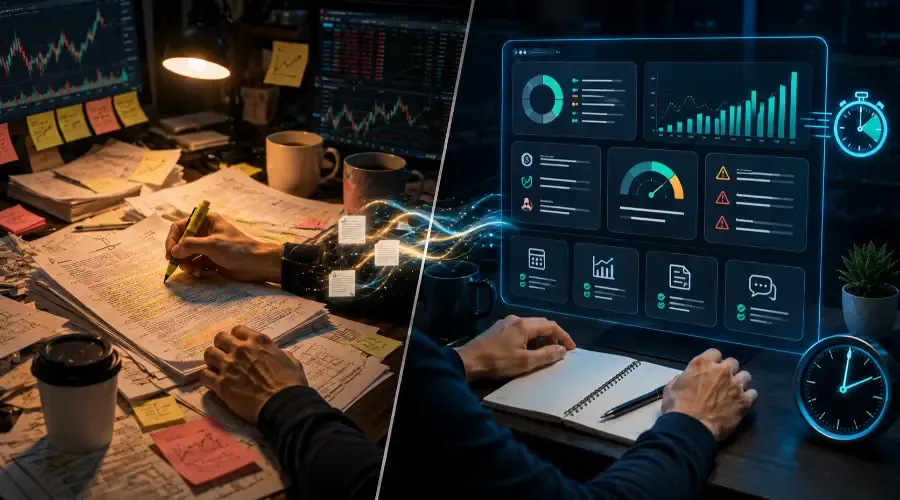
Somewhere right now, a trader is manually reading through a 40-page earnings transcript. They're highlighting lines, jumping between tabs, cross-referencing numbers, and building a picture of the company one paragraph at a time. It takes a couple of hours to do it properly.
Another trader is pasting that same transcript into Claude and getting a structured breakdown – key numbers, guidance tone, risk language, analyst Q&A highlights – in under four minutes.
That gap is what this series is about.
Now, a quick reality check: getting a flawless, institutional-grade breakdown in four minutes doesn’t happen by just typing "summarize this." It requires a well-honed prompt and a bit of iterative refinement. But once you have that workflow locked in, the time compression is real.
AI tools have changed what's possible in trading research. Not by predicting markets. Not by replacing judgment. But by compressing the time between raw information and structured understanding. That's a real edge, and it's available to any retail trader willing to learn how to use these tools properly.
This guide covers what AI actually does in a trading context, which tools are worth knowing, and how this series is structured so you can get the most out of it.
What AI Tools Are Traders Actually Using
Three AI tools come up consistently in retail trading workflows right now. To unlock their full potential – deep document processing, advanced reasoning, and live data access – you'll typically want to look into their paid subscription tiers. The free versions still offer a solid starting point.
Claude is built by Anthropic and is generally the strongest tool for deep analytical work. It handles long documents exceptionally well – earnings transcripts, SEC filings, detailed financial tables – and produces structured, nuanced output when given a well-constructed prompt. If you need to process something complex and get a thorough breakdown, Claude is typically the right tool.
ChatGPT from OpenAI is the most widely recognized AI tool and the one most traders encounter first. It's versatile, handles a wide range of tasks, and has a broad plugin and integration ecosystem. It performs well across general research and writing tasks, though it may not match Claude on long-form analytical depth.
Perplexity works differently from the other two. It's built around live web search – it can pull current information from the internet, cite sources, and give you data that reflects what's happening right now. That makes it the go-to tool for anything time-sensitive: overnight news, pre-market movers, economic releases, breaking headlines.
These three tools are not interchangeable. They each have a specific strength, and the traders who get the most out of AI typically use a combination rather than picking one and ignoring the rest.
The Three Roles AI Plays in a Trading Workflow
Before going further, it's worth being precise about what AI actually does in a trading context. There are three distinct roles.
Research Acceleration
The most immediate value AI provides is speed. Reading a 10-Q filing, processing an earnings call transcript, comparing five companies on fundamental metrics – these are tasks that used to take hours of manual reading. AI compresses that timeline significantly when you know how to use it.
This doesn't mean AI reads the documents for you and makes the calls. It means AI extracts, organizes, and structures information faster than you can do it manually – so you spend your time making decisions rather than finding data.
Analysis Support
The second role is as an analytical layer. Once you have data, AI can help you think through what it means – checking your reasoning against a second perspective, identifying factors you may have missed, framing risk in a structured way.
This works best when you treat AI like a research analyst you're working with, not an oracle you're taking orders from. You bring the judgment and the trading context. AI brings processing speed and a structured second opinion.
Workflow Automation
The third role is building repeatable processes. A well-structured prompt doesn't need to be written from scratch every day. A pre-market briefing process, an earnings analysis template, a weekly review framework – these can be built once and refined over time, turning ad-hoc AI use into a systematic workflow.
What AI Cannot Do
This matters enough to state clearly, not in the small print.
AI models have inherent latency. While tools like ChatGPT and Perplexity can browse the web, they do not have real-time, tick-by-tick market streams. They work with the information you provide or fetch. They cannot see what the market is doing this exact second, meaning they are completely unsuited for split-second execution or real-time price tracking.
AI cannot execute trades. There is no connection to your broker, no order routing, no position management. The analysis stays in the chat window. What you do with it is entirely up to you.
AI can hallucinate and misinterpret. This is true for all models. Claude and ChatGPT might invent a financial metric out of thin air if unguided. Similarly, Perplexity can misinterpret its search sources, misreading a nuanced financial headline or pulling data from an outdated or unreliable website.
Even when an AI perfectly cites its sources, those sources and the data extracted still require human verification before you risk a single dollar.
These are not reasons to avoid using AI. They're reasons to use it correctly.
The Right Mindset for Using AI in Trading
Think of AI as a research analyst who is exceptionally fast at reading and organizing information, available around the clock, and genuinely useful at structuring a problem – but who has no live market feeds, no trading experience, and no skin in the game.
That framing matters because it sets the right expectations. You would not hand a junior research analyst the keys to your trading account. You would use their output to inform your own thinking, then make your own call.
Traders who get the most from these tools understand this clearly. They use AI to work faster and think more systematically – not to outsource decisions.
How This Series Is Structured
This is the pillar post for a series of 44 blogs covering every major dimension of using AI for US stock market trading. It's organized into six hubs, each covering a specific part of the workflow.
Hub 1 – Getting Started with AI for Stock Trading
The foundation. If you're new to using AI in your trading process, this is where to begin. It covers how to choose the right tool for each task, how to write effective prompts, how to format data correctly, and how to build your first workflow.
Hub 2 – Daily Trading Workflow with AI
How AI fits into a repeatable daily process – pre-market briefings, earnings analysis, Fed statement interpretation, SEC filing review, watchlist building, and end-of-week review.
Hub 3 – Technical Analysis with AI
How to structure technical analysis input for AI, interpret momentum indicators in context, run multi-timeframe analysis, and validate support, resistance, and chart patterns using data and multimodal chart inputs.
Hub 4 – Fundamental Research with AI
Processing filings, comparing companies, evaluating valuation, analyzing earnings transcripts, reading insider transactions, and understanding cash flow quality without the manual grind.
Hub 5 – Strategy Applications with AI
How to apply AI to specific trading approaches: sector rotation, risk management, macro regime identification, strategy backtesting logic, and trading psychology bias checks.
Hub 6 – Prompt Engineering and Automation
The advanced layer. How to build a reusable prompt library, chain prompts across a multi-step analysis, combine live search tools with analytical AI, and set up a personalized trading assistant using Claude Projects.
Where to Start Based on Where You Are
If you're new to AI tools entirely, start with Hub 1 and work through it sequentially. The fundamentals matter.
If you already use AI regularly but not in a structured trading workflow, Hub 2 and Hub 5 are the most immediately practical places to go.
If you're an experienced AI user who wants to systematize and automate, Hub 6 is built for you.
One Final Point Before You Dive In
The NVDA earnings transcript that used to take two hours to process properly? Four minutes with a good prompt and the right tool.
That saved time goes somewhere. A major trap for retail traders is using that extra time to simply cram in more trades, chase more noise, or over-trade out of sheer boredom. Don't do that.
Instead, reinvest that time into deeper analysis of your core setups, better psychological preparation, or simply maintaining a more sustainable, healthy pace. The goal of AI isn't to make you trade more frantically; it’s a faster path to being better prepared.
That’s the real edge – not a shortcut to guaranteed profits, but a way to stack the odds in your favor by being more prepared than the next trader. Used right, AI stock trading tools help you see the picture faster so you can act on your own judgment with more confidence.
Frequently Asked Questions
Q1: Can AI accurately predict stock price movements?
A: No. AI tools like ChatGPT and Claude are large language models (LLMs), not crystal balls. They cannot predict future market movements or guarantee profitable setups. Instead of viewing AI as a predictive tool, successful traders use it as a processing engine to read filings, analyze data, and summarize massive amounts of market information faster. The predictive edge still comes from your own strategy and execution.
Q2: Is it safe to connect these AI tools directly to my brokerage account?
A: Generally, no, and for standard retail models, it isn't even natively supported. While advanced developers can use APIs to connect algorithmic models to brokers, standard consumer tools like Claude and ChatGPT operate entirely within their own chat windows. They cannot execute trades, route orders, or manage your positions. You should always treat AI as a research assistant and place trades manually through your broker.
Q3: How do I prevent AI from "hallucinating" or giving me fake financial data?
A: The best defense against hallucination is strict data control. Whenever you ask an AI to analyze financial figures, paste the raw data directly into the chat (such as an SEC table or an earnings transcript) and explicitly instruct the model: "Only use the provided text to answer. If the information is not present, state that you do not know." Never rely on the base knowledge of an AI model for specific, fast-moving financial metrics without double-checking the primary source.
Q4: Which AI tool is best for real-time, breaking market news?
A: Perplexity is currently the strongest tool among the big three for time-sensitive research. Unlike base models of ChatGPT or Claude which rely heavily on static training data cutoffs, Perplexity is built on live web-search architecture. It excels at scouring the internet for pre-market movers, breaking macroeconomic headlines, and immediate post-earnings reactions, while citing its sources so you can verify the information instantly.
Q5: Do I need to know how to code to use AI in my trading workflow?
A: Not at all. This entire guide and series are built around "no-code" AI implementation. You do not need to write Python or build machine learning algorithms. The true skill lies in prompt engineering – knowing how to structure your questions, format the data you feed the model, and chain prompts together to get highly accurate, institutional-grade research support using regular language.
Q6: Do I need to pay for the premium versions of ChatGPT, Claude, or Perplexity to get real trading value?
A: The free tiers are a great way to start and learn the ropes. But to unlock deep document processing, longer context windows, and advanced reasoning – the stuff that really compresses research time – you'll want to look at the paid plans. Premium versions let you upload entire earnings transcripts and get consistent, high-quality output without hitting usage caps. Start free, then upgrade once you've built a solid workflow.
Disclaimer: For educational and informational purposes only. This content does not constitute financial, investment, or trading advice. Trading stocks and options involves significant risk of loss. Always do your own research or consult a licensed professional before making any financial decisions.